Waiting for the approval of your 9G Pre-Arranged Employment Visa can be an anxious period for any expatriate professional. Because the application involves overlapping procedures with both the Department of Labor and Employment (DOLE) and the Bureau of Immigration (BI), knowing how to accurately track your documents is essential for maintaining compliance and planning your official start date.
In 2026, data privacy updates have changed how foreign nationals verify their working visa status, requiring specific application numbers rather than simple name searches.
The Dual-Tracking Reality: DOLE and BI
Verifying a working visa status in the Philippines is not a single-step inquiry because the legal right to work depends on two separate government agencies. You cannot track your final 9G visa until your preliminary labor permit is approved.
First, your employer files for the Alien Employment Permit (AEP) with DOLE to satisfy the labor market test. You must track this status first. Once DOLE approves and releases the AEP, the employer’s liaison or your visa consultant takes that permit to the Bureau of Immigration to file the actual 9G visa petition. Only then does the BI tracking phase begin. Understanding this sequential process prevents the common mistake of calling the BI to check on a visa that is still bottlenecked at the labor department.
How to Check Your AEP Status with DOLE
Because the AEP is handled by DOLE Regional Offices (such as DOLE-NCR for Metro Manila), tracking methods can vary slightly depending on where the sponsoring company is registered.
- Direct Regional Inquiry: The most reliable method is to contact the specific DOLE Regional Office where the application was lodged. You must provide the exact application reference number, the foreign worker’s full name, and the date of submission.
- Online Tracking Portals: In 2026, several DOLE Regional Offices have implemented online tracking systems on their respective sub-domain websites. Applicants can input their reference number to see if the AEP is “In Process,” “Approved,” or “Ready for Release.”
- Employer HR/Liaison: Since the employer is the official petitioner for the AEP, DOLE often prefers communicating directly with the company’s authorized representative. Maintaining close contact with your HR department is usually the fastest way to get real-time updates.
Understanding the BI Data Privacy Changes
Prior to 2021, foreign nationals could easily verify their BI visa status by searching for their name or their employer’s name on public agenda lists. However, due to strict data privacy regulations, the Bureau of Immigration no longer publishes personal names or company details in its public approval documents.
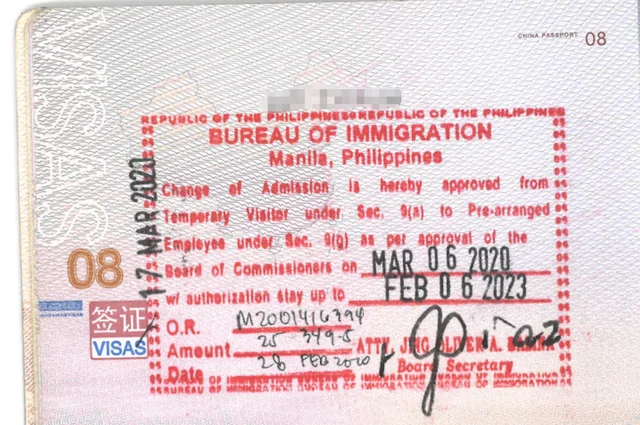
In 2026, the only way to verify a 9G visa approval online is by using the specific Application Number or the Official Receipt (OR) number issued by the BI when the petition was officially received and paid for. If your employer or consultant filed the application on your behalf, you must ask them for a copy of the official BI receipt; without this document, online verification is impossible.
Step-by-Step: Checking Your 9G Visa Status Online
The Bureau of Immigration maintains an online portal specifically designed for tracking the progress of submitted visa petitions, including the 9G work visa.
- Locate Your Receipt: Find the official BI receipt given upon submission of your 9G documents. Note the Application Number printed on it.
- Access the BI Website: Go to the official Bureau of Immigration website and navigate to the “Visa Application Status” or “Agenda Verification” page.
- Select the Agenda Date: The BI publishes “Agenda” lists based on the dates the Board of Commissioners meets to approve visas. Click on the most recent dates.
- Search the Document: Once the PDF or list is open, use the search function (CTRL + F on desktop) and type in your exact Application Number.
- Verify the Status: If your number appears on the “Approved” list, it means the Board has granted the visa, and your passport can now be submitted for official stamping.
Using the BI e-Services Portal
In recent years, the Bureau of Immigration has expanded its e-Services portal to streamline transactions for registered foreign nationals. While primarily used for Annual Reports and Exit Clearances, it also serves as a critical verification tool.
If your application was processed through a system integrated with the e-Services portal (such as the eVisa system for certain nationalities or specific tourist extensions), you can log in using your registered email ID and password. Once logged in, navigating to the “Application Status” dashboard will display real-time updates. For traditional 9G manual filings, however, the Agenda Verification method using the OR number remains the primary route.
The “Notice to Proceed” and Biometrics Capture
A critical step in the 9G tracking process is waiting for the “Notice to Proceed,” which occurs after the initial evaluation but before final approval.
Once your documents pass the pre-screening phase, the BI will schedule you for a mandatory biometrics and image capture appointment. You cannot track a final approval if you have not yet completed this step. Your HR liaison should notify you when your application reaches this stage. You must personally appear at the BI office to provide your fingerprints, digital signature, and photograph. Only after this data is integrated into the BI database will your application move to the Board of Commissioners for the final agenda approval.
Tracking the ACR I-Card Issuance
After verifying that your 9G visa is approved and stamped in your passport, there is one final document to track: the Alien Certificate of Registration Identity Card (ACR I-Card). This microchip-enabled card serves as your primary proof of legal residency and is required to open a bank account or sign a lease.
The ACR I-Card application is usually submitted concurrently with the 9G visa application. However, it takes an additional 1 to 3 weeks for the card to be printed after the visa is stamped. To check the status of your ACR I-Card, your authorized liaison must visit the BI releasing counter with the claim stub issued during your biometrics appointment. Tracking this separately ensures you do not travel domestically without your mandatory identification.
Dealing with “Pending” or “Deferred” Statuses
Sometimes, an application does not smoothly transition to “Approved.” Understanding what administrative holds mean can help you resolve issues quickly.
If your tracking inquiry yields no results for several weeks, or if your liaison reports a “Deferred” status, it usually means the BI requires additional documentation or clarification from your employer. Common reasons include discrepancies between the DOLE AEP and the BI petition, an expired corporate SEC registration, or a failure to provide proof of the company’s Understudy Training Program. In these cases, the BI will issue a formal notice detailing the deficiencies, which must be addressed immediately to prevent a full denial.
The Risk of Overstaying While Waiting
A major concern for expats checking their working visa status is the expiration of their current tourist visa while the 9G is still processing.
Filing a 9G application does not automatically freeze your tourist visa expiration clock. If you entered on a 9(a) tourist waiver and your 9G is still “in process” as your 59-day mark approaches, you must actively apply for a tourist visa extension. Relying on a pending 9G status without maintaining your underlying tourist validity will result in daily overstaying fines, which must be fully settled before the BI will release your approved work visa. Always maintain a valid stay status until the 9G stamp is physically in your passport.
Tips for Effective Visa Status Monitoring
To reduce anxiety and maintain control over your immigration timeline, adopt a proactive approach to monitoring your working visa status.
- Keep Digital Copies: Always request a clear photograph or scan of the DOLE receiving copy and the BI Official Receipt from your employer or agency.
- Set Calendar Reminders: Check the BI Agenda website every Tuesday and Friday, which are the typical days the Board releases new approval lists.
- Coordinate Weekly with HR: Establish a routine check-in with your company’s HR or legal liaison, as they receive direct notifications from the government agencies that you cannot access.
Final Thoughts
Verifying your working visa status in the Philippines requires navigating a strict two-part process: first ensuring your Alien Employment Permit (AEP) clears DOLE, and then tracking your 9G petition through the Bureau of Immigration. In 2026, data privacy rules dictate that the BI no longer publishes applicant names online; instead, you must cross-reference the Application Number on your Official Receipt with the BI’s online Agenda lists to confirm board approval. From securing the initial “Notice to Proceed” for biometrics to the final printing of your ACR I-Card, proactive monitoring—and maintaining a valid tourist status in the interim—is critical to avoiding delays and overstay penalties.
Is Support Available?
Yes. Work Visa Philippines removes the uncertainty from this complex tracking process. Our accredited team manages the entire workflow, providing you with real-time DOLE and BI updates, handling all official receipts, and coordinating your biometrics appointments to ensure your 9G visa and ACR I-Card are released on schedule.
Stop guessing about your visa status and let the experts handle your compliance. Contact Work Visa Philippines today:
- Contact Us Here
- Fill Out the Form Below
- Call us at +63 (02) 8540-9623